
The Massachusetts Department of Elementary and Secondary Education (DESE) is pleased to share the new MCAS Family Portal with you. This online tool lets you see your student's MCAS test results.
Preliminary MCAS results from spring 2026 are available. You will also see your student's results from past years (2023–2025), if available. The Family Portal will be updated in September when final results are ready.
How to Get Started
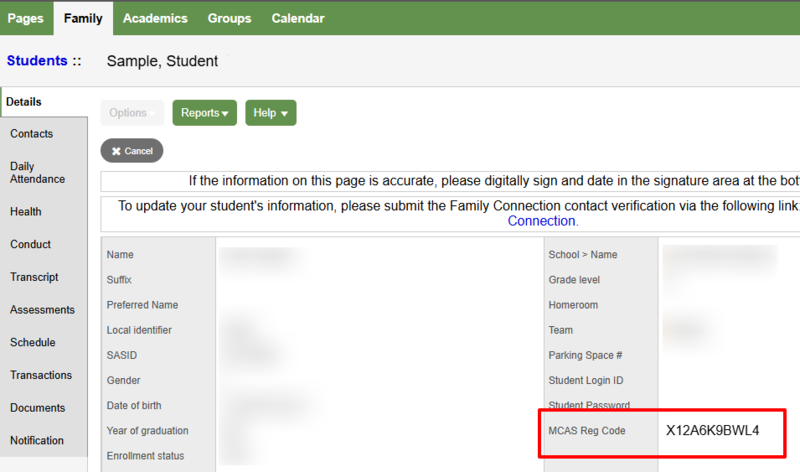
Retrieve your student’s registration code:
Visit the Walpole Public Schools Aspen Portal at https://ma-walpole.myfollett.com/aspen-login
Sign in with your family’s Login ID and Password
Select Family in the menu and then click your student’s name.
Find the MCAS Reg Code and copy it for use below.
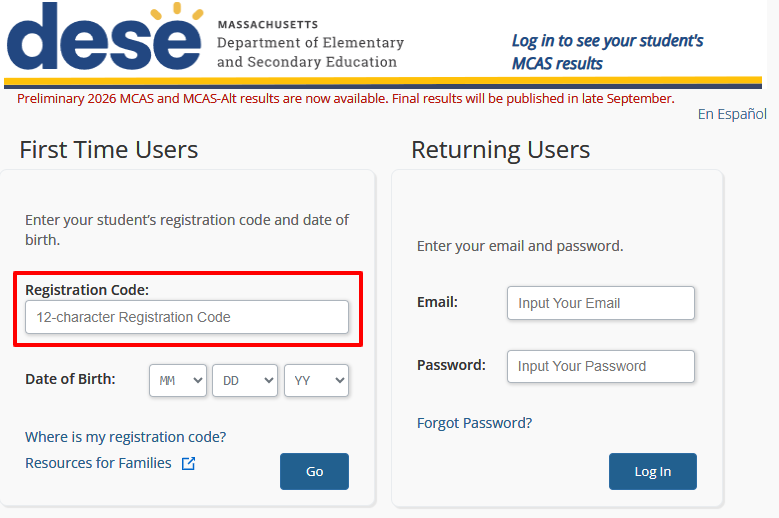
Sign in to the DESE MCAS Family Portal
Visit the DESE MCAS Family Portal at https://mcasfamilyportal.emetric.net.
Enter the Registration Code and your student’s date of birth. This will allow you to create an account with a username and password.
Using the Portal
First, view the Quick Start Guide at www.doe.mass.edu/mcas/family-portal.
Next, see the MCAS Family Portal Help Guide also at www.doe.mass.edu/mcas/family-portal, which shows you step by step how to
create an account;
add your student to your account; and
view your student's test results.
Need Help?
For questions about accessing Aspen or retrieving your registration code, contact the WPS Help Desk at helpdesk@walpole.k12.ma.us
For questions about signing in or using the MCAS Family Portal, visit the MCAS Portal Support Page or contact DESE at (781) 338-3000
For questions about understanding and interpreting the data and scores in the MCAS Report, please contact your school’s main office.